How do I work with recurring invoices?
For clients you invoice regularly for the same services, you can set up recurring invoices. This saves time and prevents you from forgetting to send invoices.
Step 1: Go to Recurring invoices
- Click on Invoices in the main menu
- Select Recurring invoices
- Click Add
Step 2: Set up the recurring invoice
-
Click Click here to choose a client and select the client
-
Set the Recurrence start date (when the first invoice will be created)
-
Choose the Recurrence type:
- Weekly
- Monthly
- Every quarter
- Every 6 months
- Yearly
-
Optional: set a Recurrence end date (leave empty for unlimited recurrence)
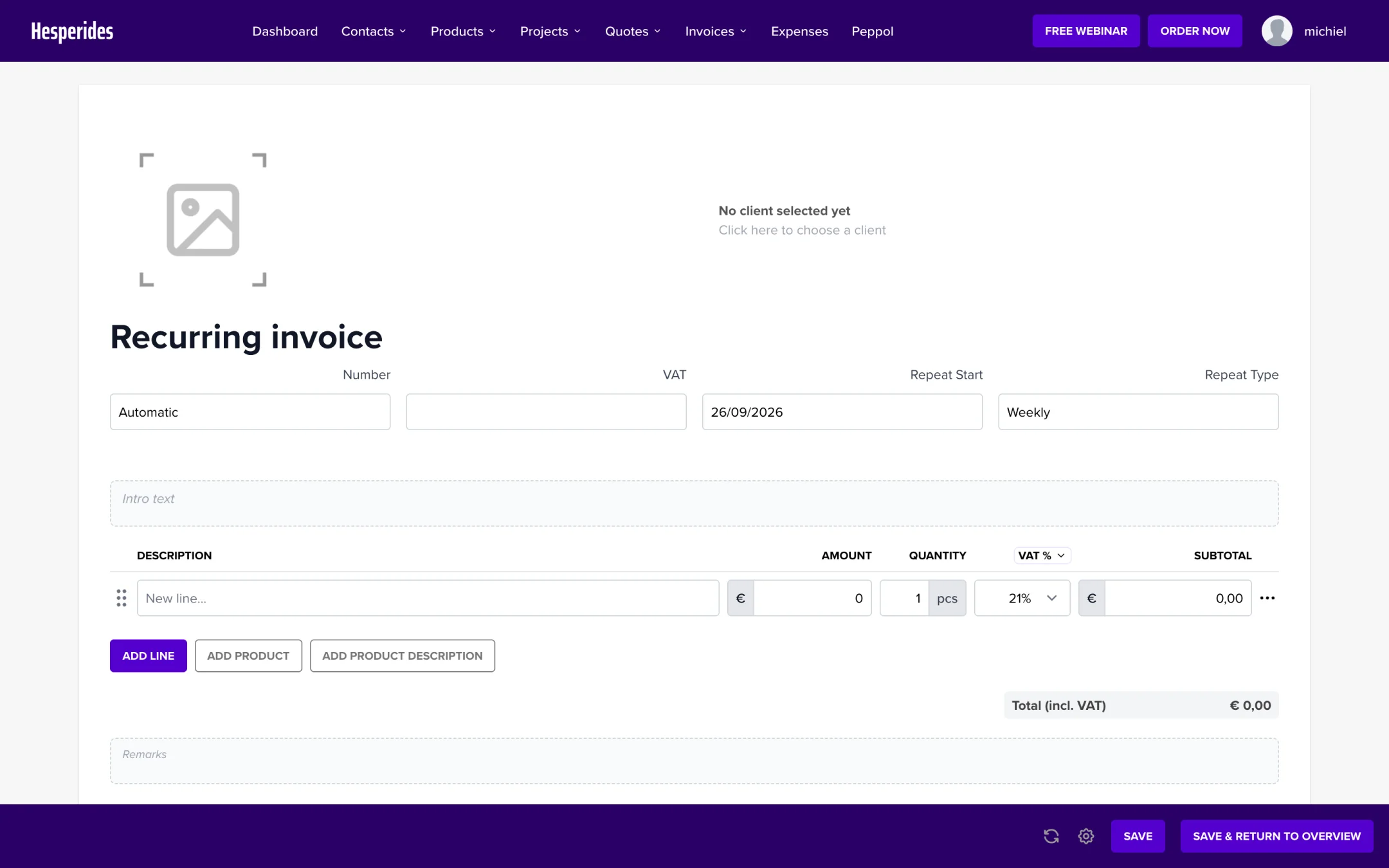
Step 3: Add invoice lines
- Click Add line or Add product
- Fill in the description, amount, and quantity
- Select the correct VAT rate
- Click Save
Managing recurring invoices
You can find all your recurring invoices under Invoices > Recurring invoices. Here you can:
- View the next invoice date
- Edit or stop the recurring invoice
- View the invoice history
Stopping a recurring invoice
- Go to Invoices > Recurring invoices
- Click on the recurring invoice you want to stop
- Set a Recurrence end date or delete the recurring invoice
💡 Tip: Use recurring invoices for subscriptions, maintenance contracts, or monthly services.
