If you invoice government bodies (B2G) or large organisations, your customer often expects specific references on the invoice: a purchase order number, buyer reference, contract or project number. These references ensure your invoice reaches the right service or department and gets processed (and therefore paid) smoothly.
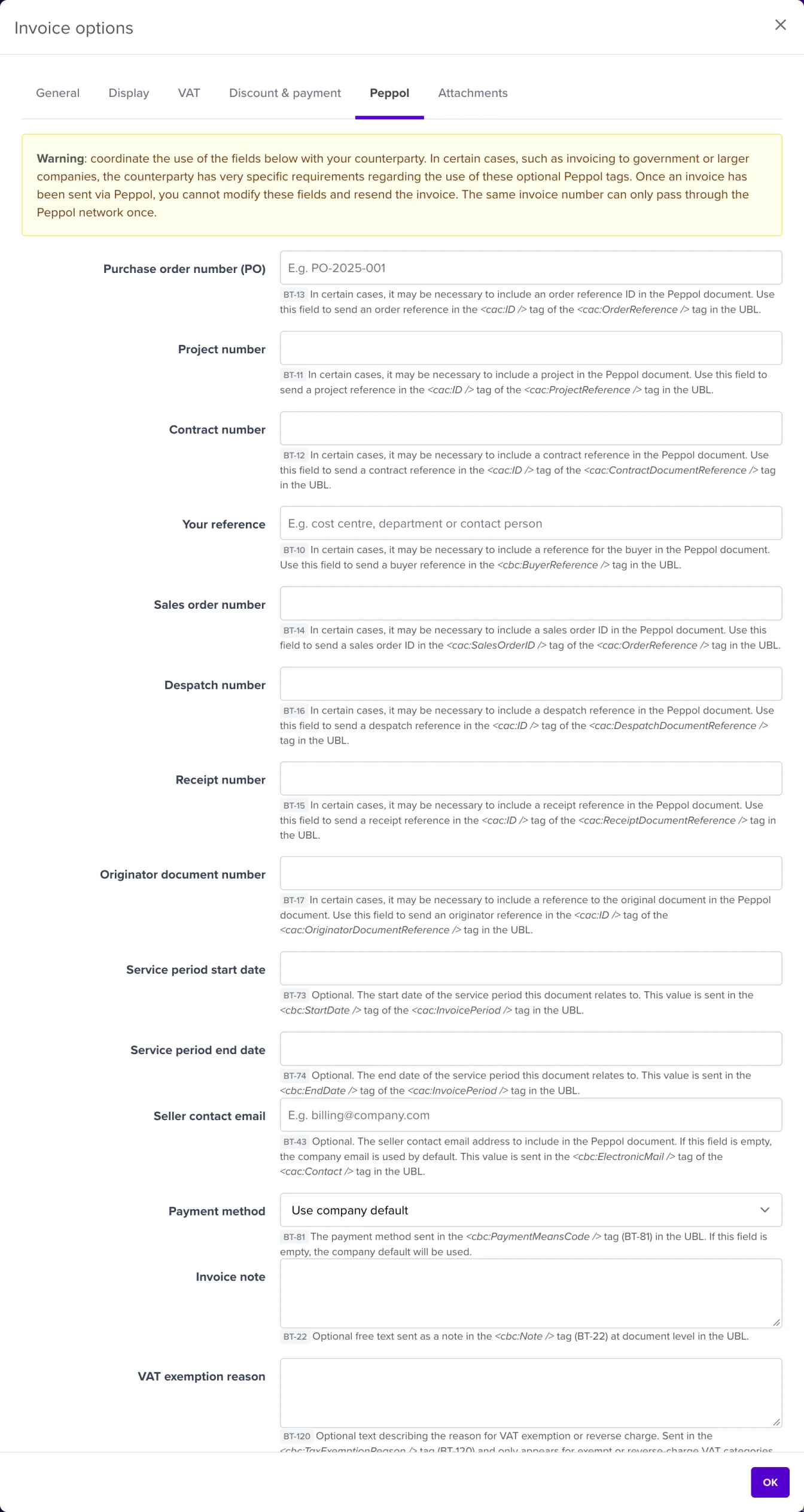
The same fields also appear in the Peppol send dialog, under the collapsible section Peppol order reference, handy if you want to fill them in or double-check at the last moment.
Each field corresponds to an official reference field (BT code) in the European e-invoicing standard:
| Field | BT code | Used for |
|---|---|---|
| Purchase order number (PO) | BT-13 | The number of your customer’s purchase order |
| Your reference | BT-10 | The buyer reference: e.g. cost centre, department or contact person provided by your customer |
| Project number | BT-11 | The project the invoice relates to |
| Contract number | BT-12 | The contract or framework agreement under which you invoice |
| Sales order number | BT-14 | Your own sales order number |
In the same tab you’ll find a few extra Peppol fields, such as the service period (start and end date, BT-73/74), a seller contact email address (BT-43), the payment means (BT-81), an invoice note (BT-22) and the VAT exemption reason (BT-120).
ℹ️ These fields exist on invoices, credit notes, purchase borderelles and recurring invoices, but not on quotes or purchase orders.
Without the right references, your invoice can leave technically perfectly via Peppol and still get stuck at the recipient: it doesn’t reach the right department, isn’t recognised by their system, or even gets rejected. That’s why NumNum shows a warning when sending via Peppol if no order reference has been filled in.
And you can’t fix it afterwards without a credit note: the same invoice number can only pass through the Peppol network once. If you forgot a required reference, you must credit the invoice and create and send a new invoice (with a new number and the correct references). So fill in the fields before sending, and align in advance with your customer on which references they expect.
My customer asks for a “buyer reference”: which field is that? That’s Your reference (BT-10). Government bodies usually provide that reference with the order.
Are these fields mandatory? Not according to the Peppol standard, but many (government) organisations do require them to process your invoice. Ask your customer if in doubt.
Where can I see whether my invoice arrived correctly? Check the sending status of your invoice; see also Resolving Peppol delivery issues.